¶ Windows
On Windows, you can use virtualization tools like VirtualBox to set up a ROS 2 environment for Olive products. Windows natively supports RNDIS (Remote Network Driver Interface Specification) but not ECM (Ethernet Control Model), which is commonly used in Linux and macOS environments for USB networking via the USB CDC class. We switched to ECM for better support on macOS and Linux. On Windows, you can connect the device directly to VirtualBox to access ROS topics. You can switch between RNDIS and ECM using parameters in Olive Components.
If you are using the USB version of Olive Components, make sure usb_protocol in the manager is set to RNDIS. If you are using Linux or macOS, switch it back to ECM.
You change this via ROS 2 params in manager or using RQT and Plugins -> Dynamic Reconfigure.
¶ RNDIS Windows Driver
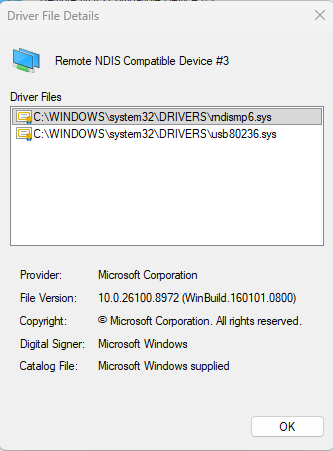
Windows 11 includes a signed RNDIS driver, but you may need to select it manually if the device is not detected as a network interface.
Please follow these steps on your Windows PC:
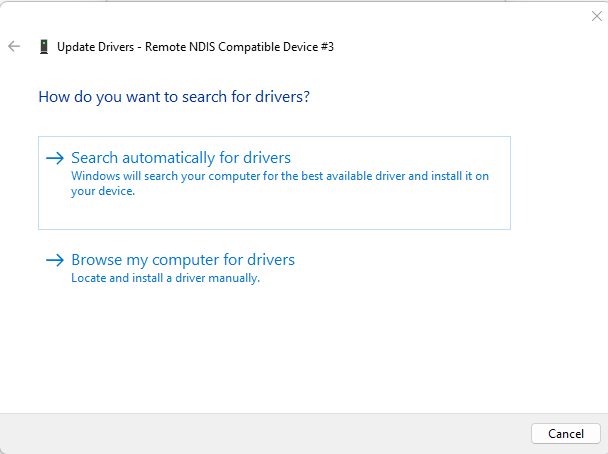
- Open Device Manager and locate the device.
- Select Update driver.
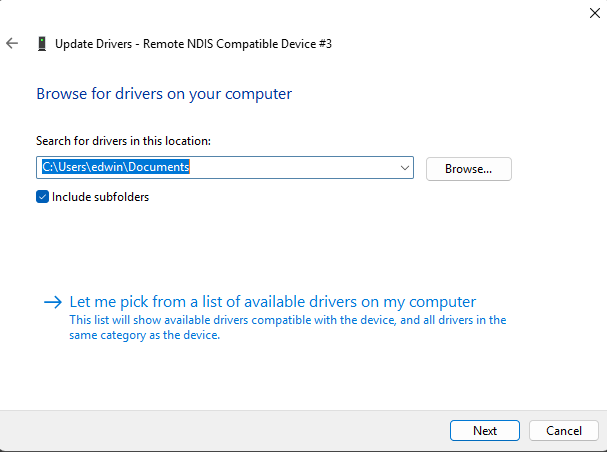
- Select Browse my computer for drivers.
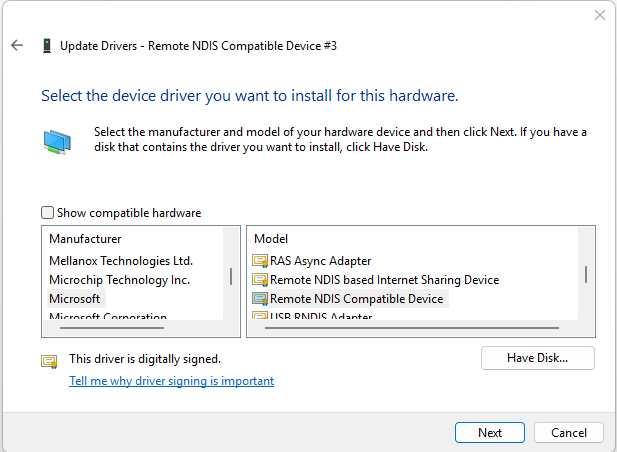
- Choose the option to manually select a driver from the list of available drivers.
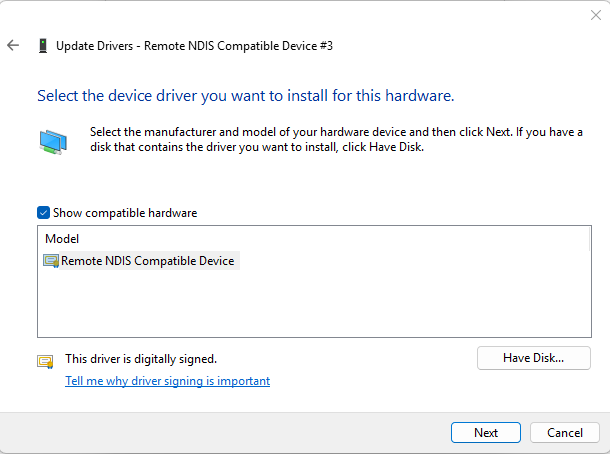
- Under Microsoft, find and select the RNDIS Compatible Device driver.
- Complete the driver installation.
- After installation, the device should be detected as a network interface.
¶ Download RNDIS Driver
If your windows for any resean doesnt have the official rndis driver you can get the .sys files from here and then you can install the driver yourslef.
Download: https://drive.google.com/drive/folders/1MXImbnpx6HTXQNoTfQ00xJuQ6d3bb9JP?usp=sharing
¶ Oracle® VM VirtualBox
VirtualBox is a powerful, open-source, cross-platform virtualization software developed by Oracle Corporation. It enables users to create and run multiple virtual machines (VMs) on a single physical computer, effectively mimicking the functionality of multiple separate computers running different operating systems. This allows users to test and develop software, run legacy applications, or experiment with new operating systems without the need for additional hardware. VirtualBox is widely used by developers, IT professionals, and enthusiasts for its ease of use, flexibility, and extensive feature set, making it a valuable tool for managing and deploying diverse computing environments.
¶ Olive® VBox Image
You can download a preconfigured Virtual Box image from here:
The username and password for this instance is "olive" and "one".
¶ Quick Setup (Windows)
- First, install VirtualBox on your host computer (https://download.virtualbox.org/virtualbox/7.0.8/VirtualBox-7.0.8-156879-Win.exe).
- To communicate with an Olive Component through VirtualBox, first connect the component to your host computer and make sure you can ping the device successfully. You should also see the network adapter in Windows.
ping 192.168.7.100

Pinging 192.168.7.100 with 32 bytes of data:
Reply from 192.168.7.100: bytes=32 time=1ms TTL=64
Reply from 192.168.7.100: bytes=32 time<1ms TTL=64
Reply from 192.168.7.100: bytes=32 time<1ms TTL=64
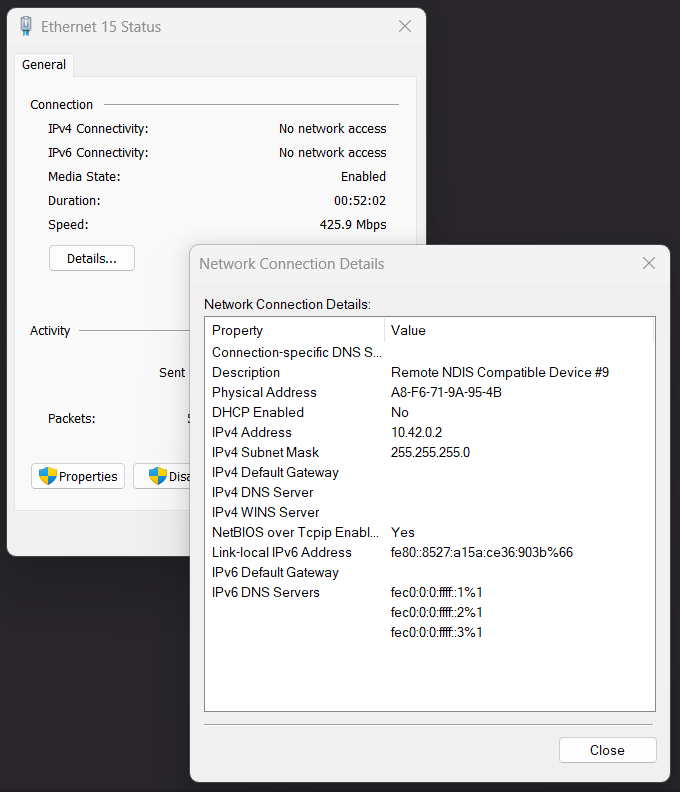
- Check the name of your Olive network in Windows. In this example, the name is "Remote NDIS Compatible Device #9":
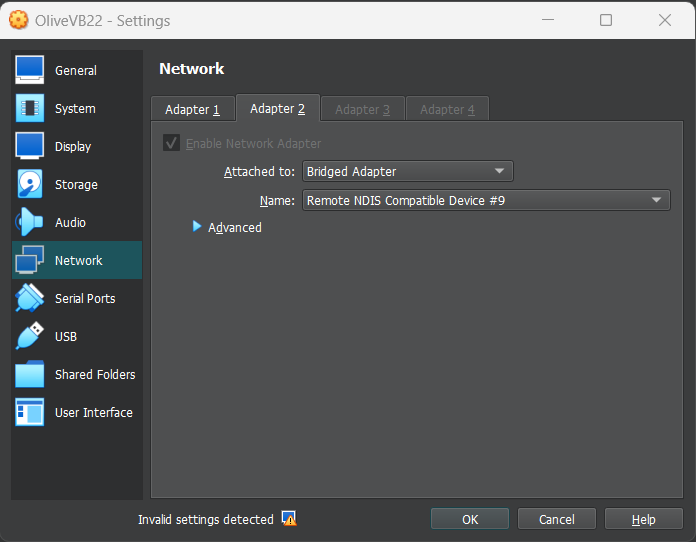
- Then open your VirtualBox settings and go to "Network". You can add network adapters only when the guest OS is powered off, so shut down guest Ubuntu first. Add a network adapter with Attached to: "Bridged Adapter", then Name: "Remote NDIS Compatible Device #9" (the same name as in step 2).
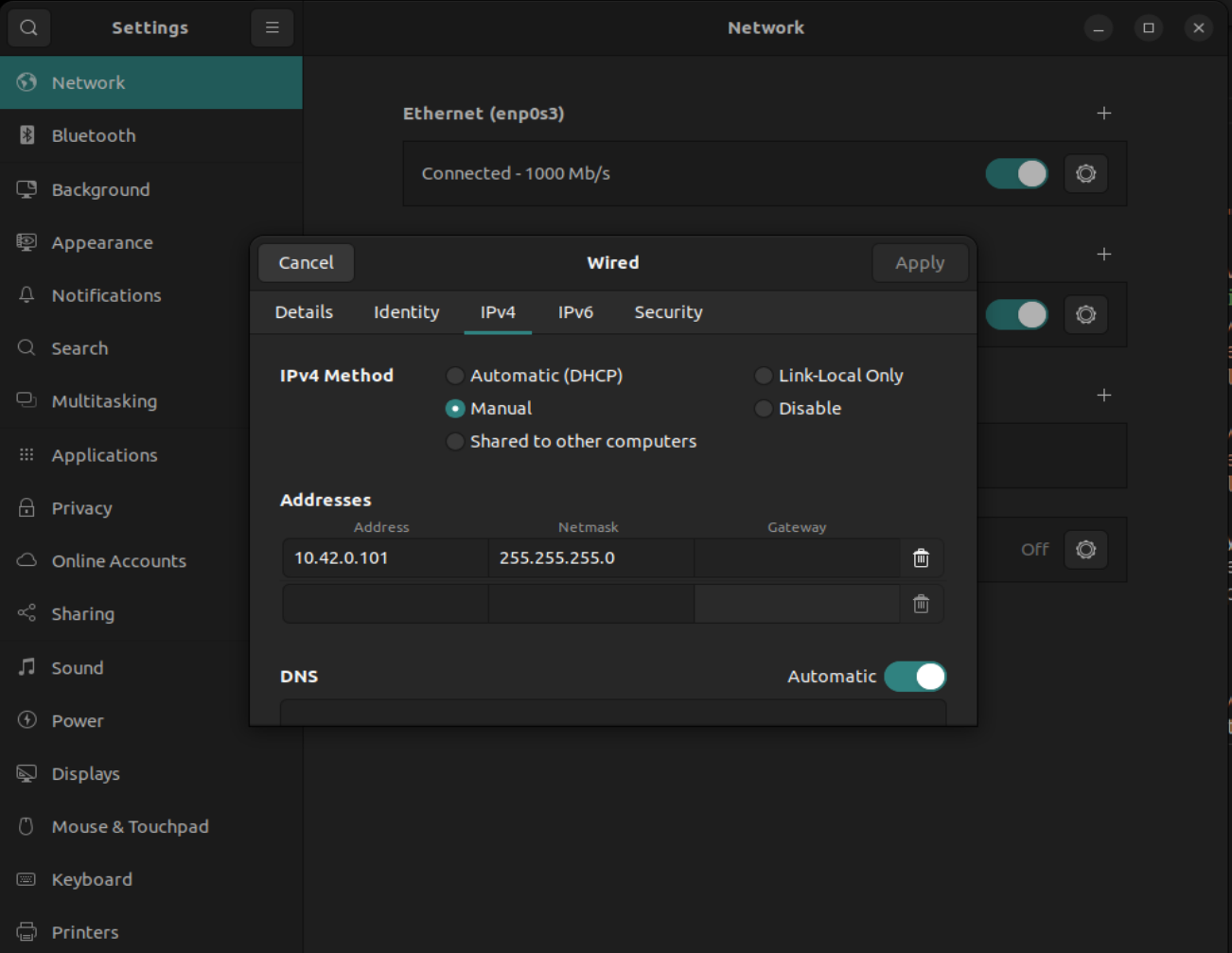
- Then go to guest Ubuntu and set a static IP for your machine in the same subnet as the Olive component IP (192.168.7.X). In this example, use 192.168.7.201. Network configuration is located in the Ubuntu Settings menu.
- Then disable and enable the network adapter in Ubuntu by the slider checkbox. Now you should be able to ping your device from the Virtual Ubuntu.


ping 192.168.7.100

PING 192.168.7.100 (192.168.7.100) 56(84) bytes of data.

64 bytes from 192.168.7.100: icmp_seq=1 ttl=64 time=1.53 ms

64 bytes from 192.168.7.100: icmp_seq=2 ttl=64 time=0.869 ms

--- 192.168.7.100 ping statistics ---

2 packets transmitted, 2 received, 0% packet loss, time 1002ms

rtt min/avg/max/mdev = 0.869/1.198/1.528/0.329 ms
- Now you can use all the ROS2 related tools here. For example you can see the topics with:
ros2 topic list

/olive/actuator/pan/goal/position
/olive/actuator/pan/joint
/olive/actuator/pan/joint/voltage
/olive/actuator/pan/led
/olive/actuator/pan/magnet/angle
/olive/actuator/pan/magnet/auto_gain
/olive/actuator/pan/magnet/diagnostic
/olive/actuator/pan/magnet/magnitude
/olive/actuator/pan/magnet/moving_average
/olive/actuator/pan/status
/olive/actuator/pan/switch
/parameter_events
/rosout
¶ MacOS
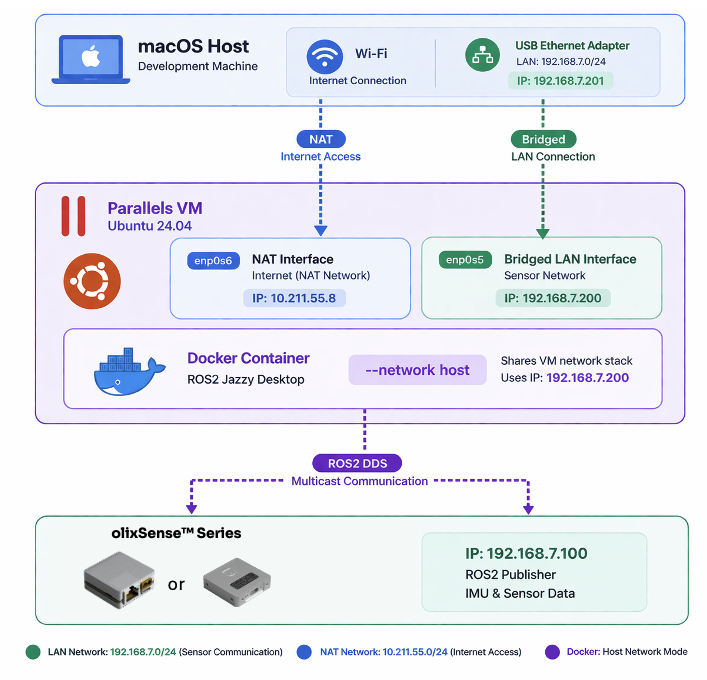
Docker on macOS runs inside a lightweight virtual machine rather than directly on the host kernel, because macOS does not support Linux container primitives like namespaces and cgroups natively. This architectural difference introduces limitations, especially in networking. In particular, Docker’s --network=host mode does not work on macOS as it does on Linux. On Linux, host mode allows containers to share the host’s network stack directly (e.g., binding to localhost seamlessly), but on macOS the container is actually inside a VM, so “host” refers to the VM itself—not the macOS host. As a result, containers cannot directly access macOS network interfaces, and services exposed via host networking are not reachable in the same way. Instead, Docker for Mac relies on port forwarding and a virtual network bridge, which adds overhead and complexity, and prevents certain low-level networking use cases such as multicast, raw socket access, or binding to specific host interfaces.
The only practical solution on macOS for achieving full Linux-like behavior—including proper host networking, direct interface access, and native container performance—is to use a full virtualization environment such as Parallels Desktop. Parallels Desktop allows you to run a complete Linux system with direct control over networking, enabling true host mode behavior and eliminating the limitations imposed by Docker’s VM abstraction on macOS. It provides a seamless and high-performance environment where Docker can run natively inside Linux, making it the most effective workaround for developers who depend on advanced networking features.
if you are using olixSense x1 / x1 Pro, disable the USB watchdog in parameters. First make sure using a normal Linux computer you have disabled the usb_watchdogservice from parameters in manager node. You will need to use RQT reconfigure and disable this there.
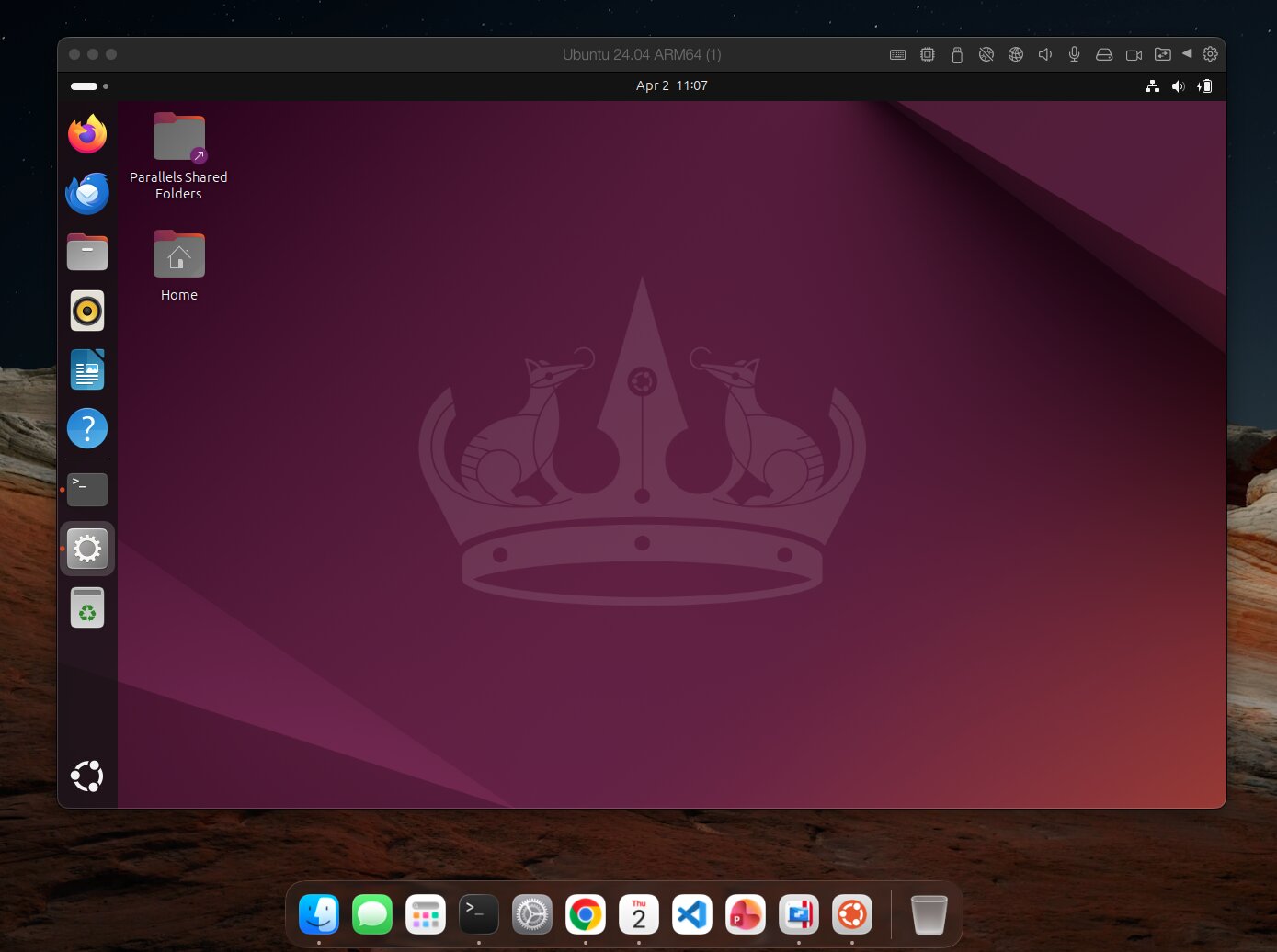
¶ 1) Network Configuration
You need to add one bridge network to the olixSense network interface (here USB 10/100/1000 LAN). This lets you maintain the internet connection through the shared network while keeping direct access to the sensor on 192.168.7.x.
Please make sure you assign a correct IP address to the network interface on macOS. In this example, we use 192.168.7.201.
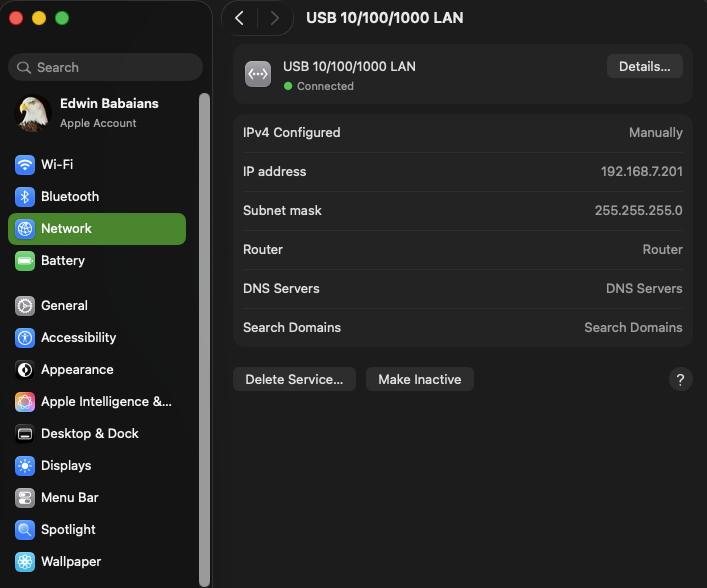
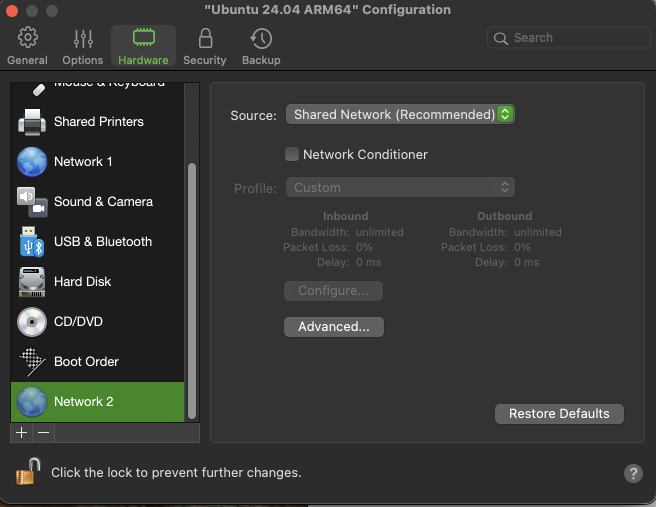
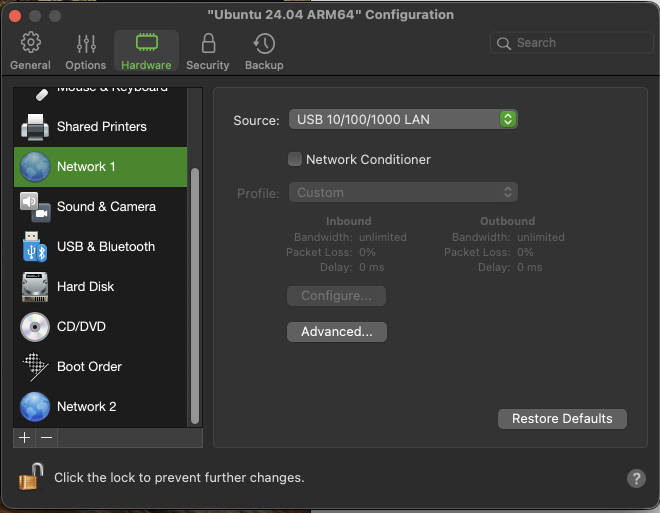
You will later need to assign a static IP address to your LAN interface. We use 192.168.7.200 as the default host IP, which is also important for NTP time synchronization. If you change this value, update it in the sensor GUI as well. The host IP should match the IP used in your Parallels Desktop VM. The following is an example of expected ifconfig output.
parallels@ubuntu-linux-2404:~$ ifconfig
docker0: flags=4099<UP,BROADCAST,MULTICAST>  mtu 1500
        ether 5a:f7:ec:55:df:ad  txqueuelen 0  (Ethernet)
        RX packets 1  bytes 28 (28.0 B)
        RX errors 0  dropped 0  overruns 0  frame 0
        TX packets 1  bytes 110 (110.0 B)
        TX errors 0  dropped 0 overruns 0  carrier 0  collisions 0

enp0s5: flags=4163<UP,BROADCAST,RUNNING,MULTICAST>  mtu 1500
        inet 192.168.7.200  netmask 255.255.255.0  broadcast 192.168.7.255
        inet6 fe80::efc5:6249:2a3e:f3d  prefixlen 64  scopeid 0x20<link>
        ether 00:1c:42:ce:6d:1a  txqueuelen 1000  (Ethernet)
        RX packets 2302  bytes 1198336 (1.1 MB)
        RX errors 0  dropped 0  overruns 0  frame 0
        TX packets 785  bytes 272406 (272.4 KB)
        TX errors 0  dropped 0 overruns 0  carrier 0  collisions 0

enp0s6: flags=4163<UP,BROADCAST,RUNNING,MULTICAST>  mtu 1500
        inet 10.211.55.8  netmask 255.255.255.0  broadcast 10.211.55.255
        inet6 fe80::d662:fa93:5120:b019  prefixlen 64  scopeid 0x20<link>
        inet6 fdb2:2c26:f4e4:0:e5d0:9e51:6ed1:5468  prefixlen 64  scopeid 0x0<global>
        inet6 fdb2:2c26:f4e4:0:3946:64b0:8ff7:dfe2  prefixlen 64  scopeid 0x0<global>
        ether 00:1c:42:e3:f3:52  txqueuelen 1000  (Ethernet)
        RX packets 59186  bytes 85104191 (85.1 MB)
        RX errors 0  dropped 0  overruns 0  frame 0
        TX packets 7252  bytes 533107 (533.1 KB)
        TX errors 0  dropped 0 overruns 0  carrier 0  collisions 0

lo: flags=73<UP,LOOPBACK,RUNNING>  mtu 65536
        inet 127.0.0.1  netmask 255.0.0.0
        inet6 ::1  prefixlen 128  scopeid 0x10<host>
        loop  txqueuelen 1000  (Local Loopback)
        RX packets 469  bytes 108729 (108.7 KB)
        RX errors 0  dropped 0  overruns 0  frame 0
        TX packets 469  bytes 108729 (108.7 KB)
        TX errors 0  dropped 0 overruns 0  carrier 0  collisions 0

parallels@ubuntu-linux-2404:~$ ¶ 2) Install ROS 2 jazzy
We selected Ubuntu 24.04, so this example uses ROS 2 Jazzy. If you install Ubuntu 22.04, use ROS 2 Humble.
Install ROS 2 Jazzy on the Linux VM using the standard installation steps. This confirms that you can discover topics and read data.
parallels@ubuntu-linux-2404:~$ ros2 topic list
/olive/olixSense/x1/id001/acceleration
/olive/olixSense/x1/id001/imu
/olive/olixSense/x1/id001/status
/olive/olixSense/x1/id001/temperature
/olive/olixSense/x1/id001/velocity
/parameter_events
/rosout
/tf
parallels@ubuntu-linux-2404:~$
¶ 3) Install NTP server
Make sure you also install an NTP server on the Parallels Desktop VM.
sudo apt install ntp¶ 4) Use docker inside Parallel Desktop VM
You can run any ROS 2 docker image, here for example we use osrf/ros:jazzy
parallels@ubuntu-linux-2404:~$ sudo docker run -it --rm --network host --privileged ros:jazzy
Unable to find image 'ros:jazzy' locally
jazzy: Pulling from library/ros
73015f6cee84: Pull complete
86790fc5660d: Pull complete
78fea7bb6a53: Pull complete
9dd69bb42469: Pull complete
e40e562919fa: Pull complete
72df34e90ece: Pull complete
1bc9ccc54bee: Pull complete
135b4a8ad856: Pull complete
4dcc6c0a18c0: Pull complete
b3ce9715a303: Pull complete
a0cf20a84f6f: Download complete
12b8c77b02fb: Download complete
Digest: sha256:86808dfea395039494b4ce75d666c10264c353435b19fa8aecf74014a4500dd8
Status: Downloaded newer image for ros:jazzy
root@ubuntu-linux-2404:/# Then you can see the topic using ros2 topic list.
root@ubuntu-linux-2404:/# ros2 topic list
/olive/olixSense/x1/id001/acceleration
/olive/olixSense/x1/id001/imu
/olive/olixSense/x1/id001/status
/olive/olixSense/x1/id001/temperature
/olive/olixSense/x1/id001/velocity
/parameter_events
/rosout
/tf¶ Linux
Ubuntu 22.04 with ROS 2 Humble and Ubuntu 24.04 with ROS 2 Jazzy are both fully supported by Olive Robotics components, ensuring smooth integration and optimal performance across both LTS platforms. Whether using IMUs, AI-powered camera sensors, or EdgeROS drivers, all Olive Robotics hardware and software modules operate flawlessly on these distributions. The ROS 2 native design of the components guarantees plug-and-play compatibility, and key features such as real-time data streaming, sensor fusion, and neural network inference are thoroughly tested and stable on both setups. This flexibility allows developers and roboticists to choose the distribution that best fits their project timeline or ecosystem without compromising on reliability or performance.