¶ 4 Software Development
This section provides an overview of important technical details that may be required during software development with the robot.
It introduces relevant system components, interfaces, and configuration aspects that developers may need when integrating custom applications, modifying existing functionalities, or extending the robot’s capabilities. Topics such as ROS 2 interfaces, communication mechanisms, simulation workflows, and system architecture are covered to support efficient development and debugging.
This section is intended for users who wish to go beyond standard operation and develop custom software solutions based on the robot platform.
¶ 4.1 Overview
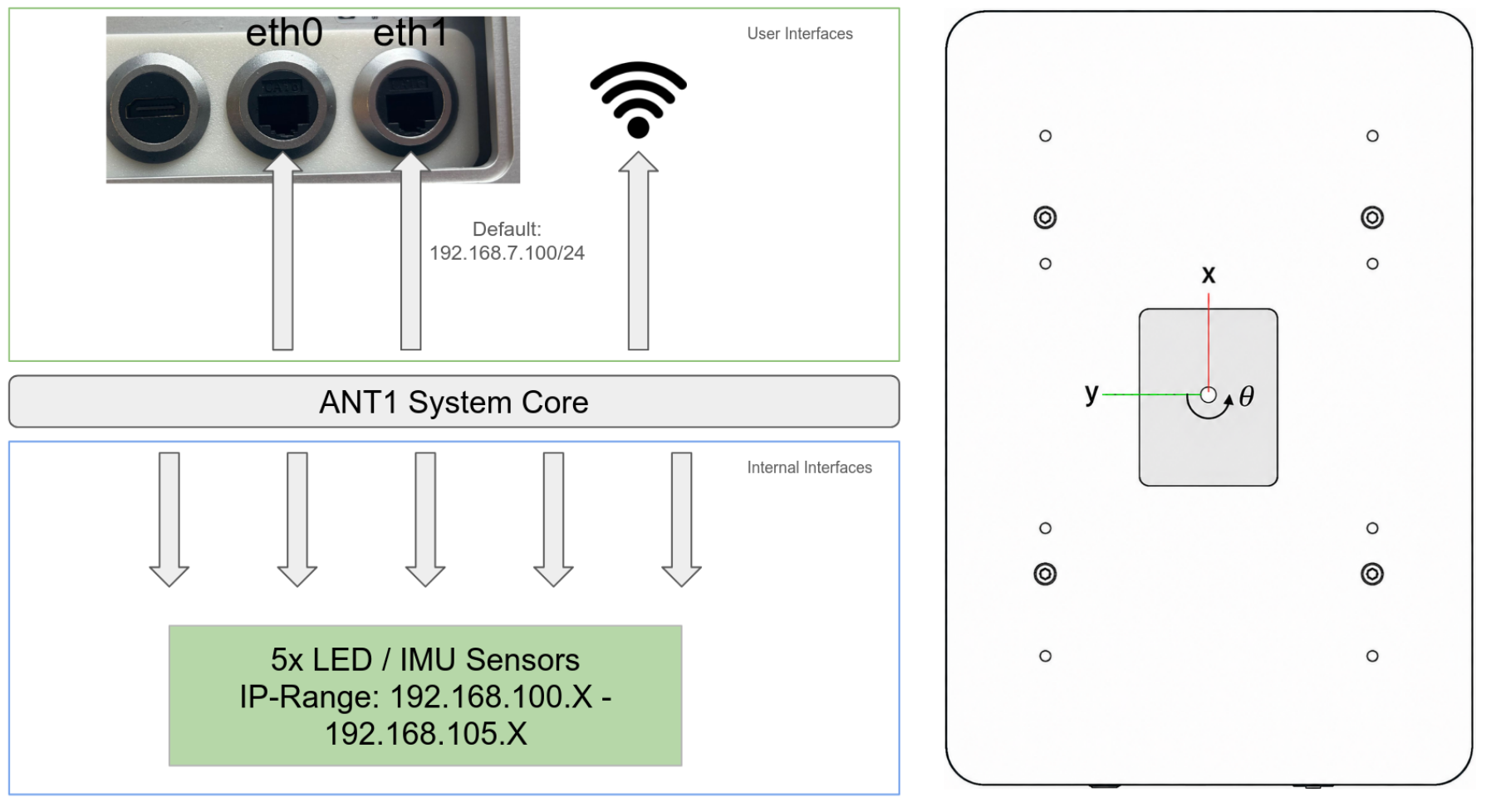
This section gives an overview of the available network interfaces and the available coordinate frames.
The eth1 interface has a default address of 192.168.7.100/24 which makes it available to access the robot and to setup the other network interfaces.
Connect to WIFI
To enable wireless access to ANT1, it can be configured to act as a client on a Wi-Fi network. The video below shows how to connect ANT1 to a Wi-Fi network.
|
|
¶ 4.2 ROS2 API
This section describes the ROS 2 interfaces provided by the robot for communication, control, and data exchange. It introduces the available topics, services, and actions that can be used to interact with the system programmatically. test
¶ Topics
All of them has a default namespace of /olive/olixRobot/ant1/id001/
| Topic name | Format | Type | Function |
| status | diagnostic_msgs/msg/DiagnosticStatus | subscriber | ANT1 status information |
| battery | std_msgs/msg/Int32 | subscriber | Battery status information in percentage |
| system_voltage | std_msgs/msg/Float32 | subscriber | Voltage of the Battery |
| ems | std_msgs/msg/Bool | subscriber | Emergency stop status, True indicates emergency stop active. |
| tf | tf2_msgs/msg/TFMessage | subscriber | Transform data between coordinate frames |
| cmd_vel | geometry_msgs/Twist | subscriber | Velocity commands (linear and angular) for controlling the robot’s motion. This is the primary interface for external velocity control. |
| joy | sensor_msgs/msg/Joy | subscriber | Joystick input data, including axis values and button states, for manual control or mode switching |
| wheel_odom | nav_msgs/msg/Odometry | subscriber | Wheel odometry data, including estimated position, orientation, and velocity. |
| wheel_rpm | std_msgs/msg/Float32MultiArray | subscriber | Wheel speed values in RPM |
In ANT1 there are in total 5 LEDs with an IMU inside (olixSense™ S1), each of them has this 4 topics (except the bottom middle one the LED can not be changed). The naming are based on their position on ANT1:
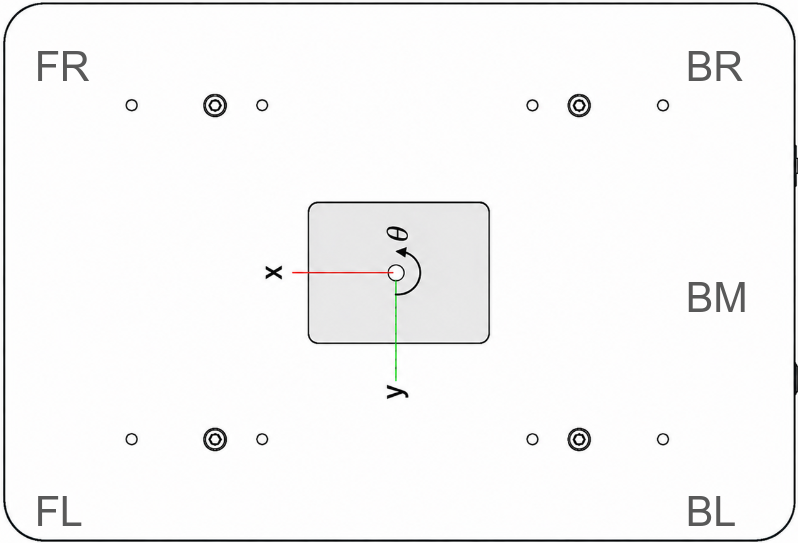
This table shows an example of the BL LED Topics. Replace the bl with e.g. fl and you get the front-left LED.
| Topics | Format | Type | Function |
| s1/bl/diagnostics | diagnostic_msgs/msg/DiagnosticArray | subscriber | Get diagnostic info of olixSense™ S1 |
| s1/bl/imu | sensor_msgs/msg/Imu | subscriber | Get the IMU data |
| s1/bl/led_rgb | std_msgs/msg/Float32MultiArray | subscriber | Get the current LED Value |
| s1/bl/user/led_rgb | std_msgs/msg/Float32MultiArray | publisher | Change the LED Color by the data array (Values are RGB format but normalized (0 - 1)) |
Example of changing the BL-LED to red:
ros2 topic pub /olive/olixRobot/ant1/id001/s1/bl/user/led_rgb std_msgs/msg/Float32MultiArray "layout:
  dim: []
  data_offset: 0
data: [1.0, 0.0, 0.0]"¶ Services
All of them has a default namespace of /olive/olixRobot/ant1/id001/
| Topics | Format | Function |
| reboot | std_srvs/srv/Trigger | Reboot the System |
| reset_wheel_odom | std_srvs/srv/Trigger | Reset Wheel Odom |
| restartDCMServices | std_srvs/srv/Trigger | Restart the DCM Service |
¶ Robot Controlling
To control the robot two following ways are possible.
- Manual Mode via controller. Follow this steps
- Via ROS2 API:
You can publish to the cmd_vel topic the velocity and choose which direction. Since the robot can only move in X and Y linear and turn on the yaw axis, an Input could look like that:
ros2 topic pub /cmd_vel geometry_msgs/msg/Twist "linear:
  x: 0.1
  y: 0.1
  z: 0.0
angular:
  x: 0.0
  y: 0.0
z: 2.0" Based on example above ANT1 drives 0.1 m/s in x and y direction and turns with 2 m/s
¶ 4.3 ROS2 Tools
¶ RVIZ2
RViz2 is a powerful 3D visualization tool used within the ROS 2 ecosystem. It provides real-time insight into the robot’s state, sensor data, and navigation behavior while the system is operating.
With RViz2, users can:
- Visualize LiDAR scans and point clouds
- Monitor the robot’s pose and TF coordinate frames
- Display maps generated by SLAM
- Observe planned navigation paths
- Send navigation goals (e.g., 2D Nav Goal / Nav2 Goal)
- Initialize the robot’s pose using the 2D Pose Estimate tool
RViz2 is an essential tool during development, testing, and debugging. It allows users to verify that sensor data aligns correctly with the map, confirm that localization is stable, and ensure that navigation planning behaves as expected.
Preconfigured RViz2 layouts are provided with the ANT1 repository to simplify setup and reduce manual configuration.
¶ Remappings
Sometimes, remapping topics can be useful, especially in RViz2. For example, RViz2 listens to /tf by default, and this cannot be changed manually in RViz. But our tf topic is /olive/olixRobot/ant1/id001/tf . Therefore, topic remapping may be necessary when using RViz2.
Please see the following command, which shows how to remap topics:
ros2 run rviz2 rviz2  --ros-args   -r __node:=rviz   -r __ns:=/olive/olixRobot/ant1/id001   -r /tf:=tf   -r /tf_static:=tf_static   -r /initialpose:=initialpose
-r /goal_pose:=goal_pose -r /navigate_to_pose:=navigate_to_pose -r /navigate_through_poses:=navigate_through_posesHere it can be seen that the namespace /olive/olixRobot/ant1/id001 is used and /tf is changed to tf. RViz2 then listens to /olive/olixRobot/ant1/id001/tf.
¶ Gazebo
The ANT1 platform is supported by a Gazebo-based simulation environment. This environment allows users to test functionalities, validate algorithms, and simulate realistic operational scenarios without requiring physical hardware.
A comprehensive introduction to the simulation setup, configuration, and usage is provided in Chapter 6: Simulation.
¶ 4.4 WebUI
The ANT1 will provide an optional WebUI to simplify day-to-day operation and configuration. The WebUI is designed for user-friendly access to common settings without requiring direct ROS 2 commands.
With the WebUI, users will be able to:
- Adjust key parameters (e.g., navigation and control settings)
- Enable or disable supported features
- Monitor robot status and basic system information
- Perform basic control and operation tasks
This section will be updated as the WebUI becomes available.