¶ 3 Software Development
This section provides an overview of important technical details that may be required during software development with the robot.
It introduces relevant system components, interfaces, and configuration aspects that developers may need when integrating custom applications, modifying existing functionalities, or extending the robot’s capabilities. Topics such as ROS 2 interfaces, communication mechanisms, simulation workflows, and system architecture are covered to support efficient development and debugging.
This section is intended for users who wish to go beyond standard operation and develop custom software solutions based on the robot platform.
¶ 3.1 Network Map Overview
This section describes the robot’s network structure and how to establish a proper connection.
The diagram below illustrates the network address mapping of the robot ANT1. Each IP address corresponds to a specific hardware module. By accessing these addresses, users can communicate with and retrieve data from the respective components.
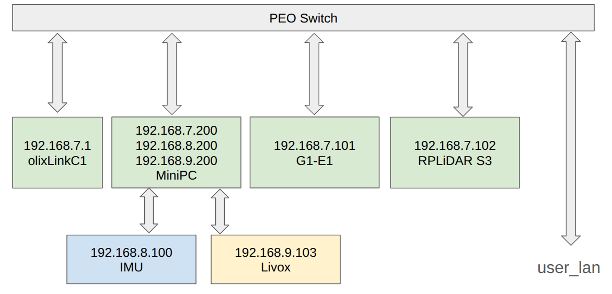 |
| Olive ANT1 Network Map(not G1-E1) |
¶ 3.2 ROS2 API
This section describes the ROS 2 interfaces provided by the robot for communication, control, and data exchange. It introduces the available topics, services, and actions that can be used to interact with the system programmatically.
Understanding these interfaces is essential for integrating custom applications, developing autonomous behaviors, and extending the robot’s capabilities within a ROS 2 environment.
¶ Robot Controlling
This section lists the ROS 2 topics and services responsible for motion control and control mode management. These interfaces define how velocity commands are transmitted to the robot and how different control sources interact with the system.
Topics
| Topic name | Format | Type | Function |
| /olive/olixG1/id001/cmd_vel | geometry_msgs/Twist | subscriber | Receives velocity commands (linear and angular) for controlling the robot’s motion. This is the primary interface for external velocity control. |
| /olive/olixG1/id001/joy | sensor_msgs/msg/Joy | subscriber | Receives joystick input data, including axis values and button states, for manual control or mode switching |
Service
| Service name | Format | Request variable | Function |
| /start_motor | std_srvs/srv/Empty | None | Starts the motor system and enables motion control. |
| /stop_motor | std_srvs/srv/Empty | None | Immediately stops the motor system and disables motion control. |
- for example:
# Start motor
ros2 service call /start_motor std_srvs/srv/Empty {}

# Stop motor
ros2 service call /stop_motor std_srvs/srv/Empty {}
¶ Sensor data
This subsection describes the ROS 2 topics related to the robot’s sensor data and state feedback. These interfaces publish real-time information from onboard sensors such as LiDAR, IMU, odometry, battery monitoring, and status indicators.
Access to these topics enables users to monitor the robot’s environment perception, motion state, and system health. Sensor data forms the foundation for localization, mapping, navigation, and higher-level autonomous functionalities.
Topics
| Topic name | Format | Type | Function |
| /odom | nav_msgs/Odometry | publisher | Publishes the robot’s estimated position and velocity based on wheel odometry and state estimation (e.g., EKF). Used for localization and navigation. |
| /olive/olixG1/id001/battery | sensor_msgs/BatteryState | publisher | Publishes battery status information such as voltage, current, charge level, and health state. |
| /olive/olixG1/id001/led1/rgb | std_msgs/ColorRGBA | publisher | Publishes the current RGB color state of LED 1 for status indication. |
| /olive/olixG1/id001/led2/rgb | std_msgs/ColorRGBA | publisher | Publishes the current RGB color state of LED 2 for status indication. |
| /olive/olixG1/id001/led3/rgb | std_msgs/ColorRGBA | publisher | Publishes the current RGB color state of LED 3 for status indication. |
| /olive/olixG1/id001/led4/rgb | std_msgs/ColorRGBA | publisher | Publishes the current RGB color state of LED 4 for status indication. |
| /scan | sensor_msgs/LaserScan | publisher | Publishes merged and filtered 2D LiDAR scan data for mapping, localization, and obstacle detection. Points belonging to the robot’s own body are filtered out to avoid self-reflections and false obstacle detection. |
| /scan_raw | sensor_msgs/LaserScan | publisher | Publishes raw LiDAR scan data before filtering or merging. |
| /tf | tf2_msgs/TFMessage | publisher | Publishes dynamic coordinate frame transformations. |
| /tf_static | tf2_msgs/TFMessage | publisher | Publishes static coordinate frame transformations. |
¶ Navigation
This subsection describes the ROS 2 topics and services related to the robot’s navigation system. These interfaces enable users to send navigation goals, monitor planning status, and interact with localization and path-following components.
The navigation API provides access to high-level autonomous movement capabilities, including goal-based navigation, waypoint execution, and path planning. Understanding these interfaces is essential for integrating custom applications and managing autonomous tasks programmatically.
Topics
| Topic name | Format | Type | Function |
Services
| Service name | Format | Request variable | Function |
| /waypoint_server/delete_waypoint | waypoint_server_interfaces/srv/DeleteWaypoint | string name | Deletes the specified waypoint from the waypoint database. If the waypoint does not exist, the request will fail. |
| /waypoint_server/list_waypoints | waypoint_server_interfaces/srv/ListWaypoints | None | Returns a list of all currently stored waypoint names. |
| /waypoint_server/move_to_waypoint | waypoint_server_interfaces/srv/MoveToWaypoint | string name | Commands the robot to navigate to the waypoint identified by the given name. The waypoint must exist and the navigation stack must be active. |
| /waypoint_server/save_waypoint | waypoint_server_interfaces/srv/SaveWaypoint | string name | Saves the robot’s current base position (in the map frame) as a waypoint with the specified name. |
| /waypoint_server/save_waypoint_pose | waypoint_server_interfaces/srv/SaveWaypointPose |
string name geometry_msgs/Pose pose |
Saves a waypoint with a user-defined pose in the map frame. The pose must be provided in map coordinates. |
- Here are the examples:
# Save current robot position as a waypoint
ros2 service call /waypoint_server/save_waypoint \
  waypoint_server_interfaces/srv/SaveWaypoint \
  "{name: 'wp_1'}"
# Save a custom pose as waypoint
ros2 service call /waypoint_server/save_waypoint_pose \
  waypoint_server_interfaces/srv/SaveWaypointPose \
  "name: 'wp_custom'
pose:
  position:
    x: 2.0
    y: 1.0
    z: 0.0
  orientation:
    x: 0.0
    y: 0.0
    z: 0.0
    w: 1.0"
# List all saved waypoints
ros2 service call /waypoint_server/list_waypoints \
  waypoint_server_interfaces/srv/ListWaypoints \
  "{}"
# Navigate to a saved waypoint
ros2 service call /waypoint_server/move_to_waypoint \
  waypoint_server_interfaces/srv/MoveToWaypoint \
  "{name: 'wp_1'}"
# Delete a waypoint
ros2 service call /waypoint_server/delete_waypoint \
  waypoint_server_interfaces/srv/DeleteWaypoint \
  "{name: 'wp_1'}"
# (Optional) Check service type
ros2 service type /waypoint_server/save_waypoint
- For a full example, see the example in Section 2.6 Navigation.
¶ 3.3 ROS2 Tools
¶ RVIZ2
RVIZ2 is a powerful 3D visualisation tools, whRViz2 is a powerful 3D visualization tool used within the ROS 2 ecosystem. It provides real-time insight into the robot’s state, sensor data, and navigation behavior while the system is operating.
With RViz2, users can:
- Visualize LiDAR scans and point clouds
- Monitor the robot’s pose and TF coordinate frames
- Display maps generated by SLAM
- Observe planned navigation paths
- Send navigation goals (e.g., 2D Nav Goal / Nav2 Goal)
- Initialize the robot’s pose using the 2D Pose Estimate tool
RViz2 is an essential tool during development, testing, and debugging. It allows users to verify that sensor data aligns correctly with the map, confirm that localization is stable, and ensure that navigation planning behaves as expected.
Preconfigured RViz2 layouts are provided with the ANT1 repository to simplify setup and reduce manual configuration.
¶ Gazebo
The ANT1 platform is supported by a Gazebo-based simulation environment. This environment allows users to test functionalities, validate algorithms, and simulate realistic operational scenarios without requiring physical hardware.
A comprehensive introduction to the simulation setup, configuration, and usage is provided in Chapter 4: Simulation.
¶ 3.4 WebUI
The ANT1 will provide an optional WebUI to simplify day-to-day operation and configuration. The WebUI is designed for user-friendly access to common settings without requiring direct ROS 2 commands.
With the WebUI, users will be able to:
- Adjust key parameters (e.g., navigation and control settings)
- Enable or disable supported features
- Monitor robot status and basic system information
- Perform basic control and operation tasks
This section will be updated as the WebUI becomes available.